VissuBack to home

Changelog

New features, improvements and fixes in Vissu.

v0.3.0

Spanish, Pro and Lifetime plans, and analytics

Vissu now speaks Spanish, adds Pro and Lifetime plans, and shows Pro users how their page performs.

Three changes that make Vissu easier to use in your language and easier to grow with.

Spanish and English

The whole product is now available in Spanish and English: the landing page, the editor, onboarding, settings, error messages and the legal pages.

  • Automatic. Vissu picks the language from your browser and remembers your choice. Your address and your page do not change.
  • Your choice. Open Settings, then Appearance, and choose a language with the new selector above the theme.
  • Changelog included. Every entry here now has a Spanish version.

Your page content stays exactly as you wrote it. Only the interface is translated.

Pro and Lifetime plans

Pricing is now live on the landing page, with three plans: Free, Pro and Lifetime.

  • Free stays free. Your page, every widget and every theme, with no credit card.
  • Pro and Lifetime add the verified check and detailed analytics. Pro is billed monthly or yearly. Lifetime is a one-time payment with a limited number of seats.
  • Secure checkout. Payments are handled by Polar, and you can manage your plan from the editor.

Analytics for Pro

See how visitors use your page, without tracking them.

  • Views and clicks. Follow views and clicks across your page over 7, 30 or 90 days, compared with the previous period.
  • Private by design. Analytics keep no personal profile of your visitors, and your own visits are not counted.
  • Pro and Lifetime only. Free accounts see a short preview with a link to the plans.

Smaller things

  • The landing page copy is clearer, and the list of upcoming features is shorter and more honest about what is next.
v0.2.0

Folders, projects with items and smoother widget uploads

Group widgets into folders, fill a project card with its own links, and upload logos with confidence.

Your page now has more room to breathe. Group related widgets together, and let a project show the things that belong to it.

Folders

Drag a widget onto another one to turn them into a folder, just like on a phone home screen. The target reacts as soon as you hover over its center, and dropping there creates the folder. Dropping near an edge still reorders your widgets.

Dragging a widget onto another one to create a folder

  • Open to explore. Tap a folder to see everything inside. Visitors get the same view, and every link stays a real link.
  • Any size you like. Folders resize like other widgets and show as many icons as fit, at a constant size.
  • Take things out. Drag an item out of the open folder to put it back on your page. A folder with a single item left dissolves on its own.
  • Soft motion. Grouping, resizing and removing now glide instead of jumping. Reduced motion is respected.

Projects with items

A large project card can now hold other widgets, such as your social links or screenshots, in a tile strip along its bottom edge.

A large project card with its own items

  • Drop to add. Drag a widget onto a large project to add it as an item. Manage them from the project's edit dialog: reorder, remove or delete.
  • Safe by design. A project with items cannot be made smaller until you remove them, and deleting it tells you how many items go with it.
  • Quick add and remove. Items pop in and out without shifting the rest of the strip.

Uploads you can trust

  • Logos are saved with the project. The image and the project are now saved together, so a failed save no longer leaves an orphaned file behind.
  • Instant preview. New logos show up right away and roll back with a message if something goes wrong, just like your profile photo.
  • Remove a logo. Projects have a new Remove logo button.
  • Sizes stay put. Switching between light and dark no longer sends a widget back to its previous size.
v0.1.2

Better widget dragging on phones and tablets

Move widgets from anywhere with a long press, without leftovers on the screen, and a tighter mobile landing.

Editing your page on a touch screen should feel as good as on a computer. This round is all about that.

  • Drag from anywhere. On phones and tablets, press and hold any part of a widget to pick it up. A quick swipe still scrolls the page as usual.
  • No more stuck ghosts. Moving a widget used to leave a faded copy of it on the screen. Dropping, cancelling or switching apps now always leaves your grid clean.
  • Feedback you can feel. A short vibration confirms when a widget is picked up and when its new position is saved, on devices that support it.
  • A tighter landing page on mobile. The big empty space under the demo is gone, and every section now has the same breathing room.
v0.1.1

Smoother profile saves and onboarding fixes

Saving your profile no longer makes you wait, and skipping an onboarding step keeps what you typed.

A round of fixes for the things that felt slow or lost your work.

  • Profile saves feel instant. When you change your photo or cover, the dialog closes right away and your page shows the new image while it uploads in the background. If something goes wrong, your previous profile comes back with a message.
  • Skipping onboarding steps keeps your data. Choosing "Skip for now" used to clear your photo, name and description, so going back and pressing Continue saved nothing. Everything you entered now stays in place.
  • Faster saves. Old images are cleaned up after your profile is saved, so you wait less.
  • Help menu. The link to X now opens the right profile.
v0.1.0

Light and dark themes, a new Settings dialog and faster uploads

Make Vissu feel like yours, manage your account in one place, and upload images without waiting.

Vissu now has a Light and a Dark theme, and a Settings dialog that puts your account in one place.

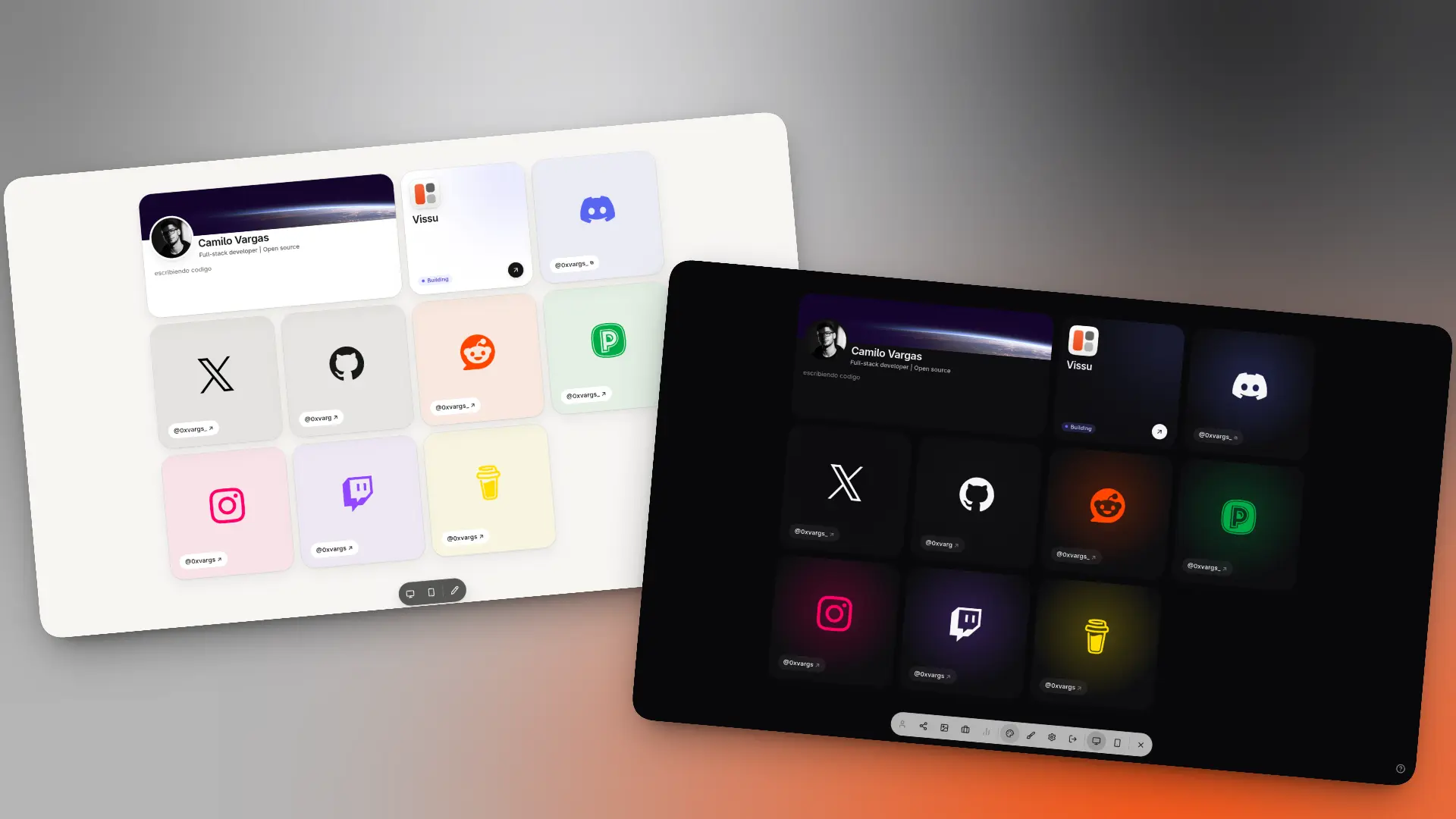
Light and dark themesLight and dark themes

  • Light and Dark themes. Switch from the dock dropdown or from Settings > Appearance.
  • Profile. Change your username and display name right from Settings.
  • Security. See your real list of active sessions and revoke any of them.
  • Danger zone. Delete your account and its data whenever you want.
  • Faster image uploads. Images are now compressed in the background, so uploads no longer block you.